
Greek & Hebrew
Every word, down to the original.
Tap any word for its meaning, how often the Bible uses it, how it’s translated, and every verse that uses it.
For preachers, teachers, managers and speakers
Beautiful, color-coded notes that are easy to follow up front. Verses that fill themselves in, a study library and Bible maps beside your notes, an AI partner that knows your style, and slides that build themselves.
14 days of everything. No credit card.
Get the apps for your devices →Grace Is Free
Ephesians 2:8–9
Notes
 RobinYour writing partner
Can you look over Sunday’s notes?
Point 1 lands well. Point 3 needs a picture people can hold onto. Try the apple tree: fruit grows from the root.
✓ Add as a story
Easy to follow
Every part of your talk gets its own color: main points, Scripture, stories, quotes, discussion questions and action steps. When you look down mid-sentence, you know exactly where you are.
Point at a color to find it at a glance:
Add Scripture
Filled in, formatted and ready. No copy and paste.
Multiple Bible version preferences are available.
Hours back every week
No more copying verses from one tab and fixing fonts in another. Type a reference and the passage fills itself in. Your notes come out formatted, numbered and ready, so your time goes into the message.
Ready on any device
Teach Mode sizes your notes for the screen in your hand, so you never squint. There’s a timer, a text-size slider, and the screen stays awake. It even works when the Wi-Fi doesn’t.
Two Teach Mode styles: Pages or Scroll.
PagesSwipe your notes one page at a time.
ScrollScroll down through all your notes on one page.
Export & share
When your notes are done, so is the rest. Slides for the screen, notes for the pulpit or podium, handouts for the seats and one link for your media team. All from the same notes, all in your look, and none of it rebuilt by hand.
Export
Presenting
A small slide icon glows in your notes beside whatever the room is seeing. Tap a different one and the slide changes. Your clicker still works too.
Present from BowNotes
Tap Present. Your slides fill the screen. Nothing to download.
Run it from your notes
Tap an icon in Teach Mode to put that slide up, from anywhere.
Or download them
The free Helper links PowerPoint, Keynote or ProPresenter over Wi-Fi.
Remote mode
Run the slides from a phone or tablet: now, next, every slide, and the music.
The whole service
Loops before and after the sermon, opening and closing slides, cut or fade.
Your slides, your music
Design slides, upload pictures, and play your own playlists under them.
Your whole study desk
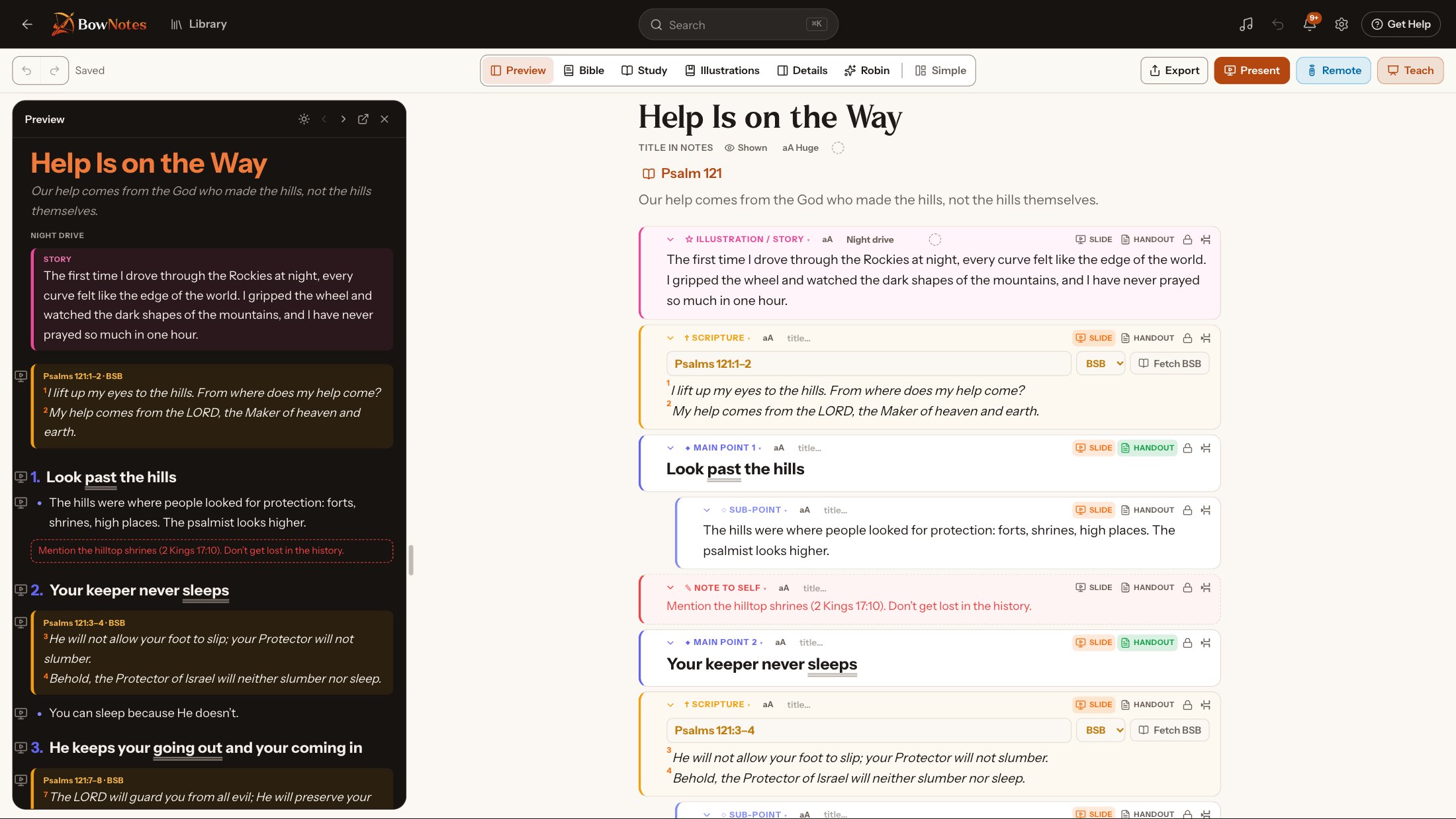
Write with just your notes and a live preview. When it’s time to dig in, open the tools you need beside them, or spread them across a second monitor.
See it as you’ll teach it
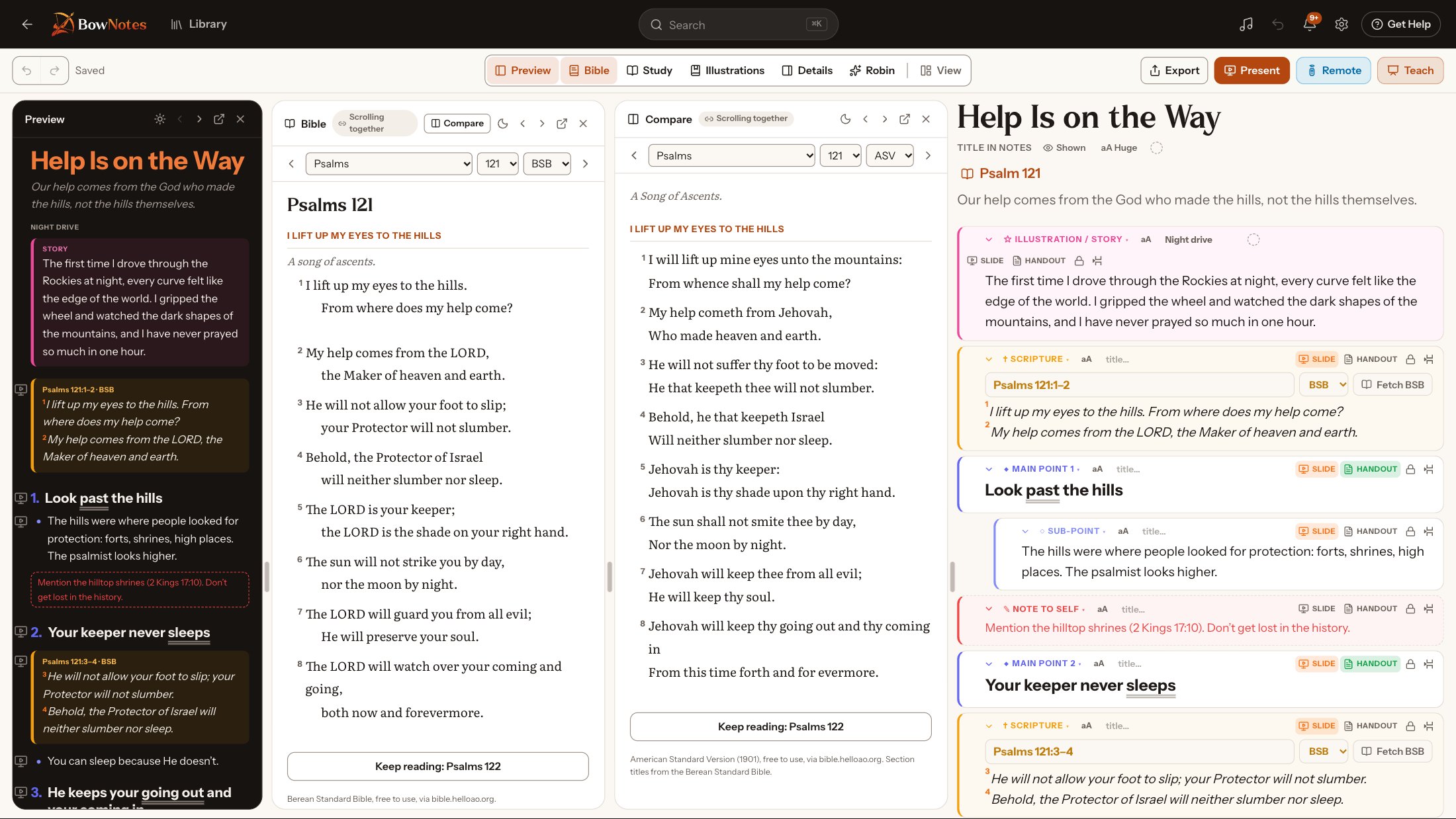
The live preview follows the block you’re editing, in light or dark.
Two Bibles, side by side
Compare versions or passages. They scroll together, verse for verse.
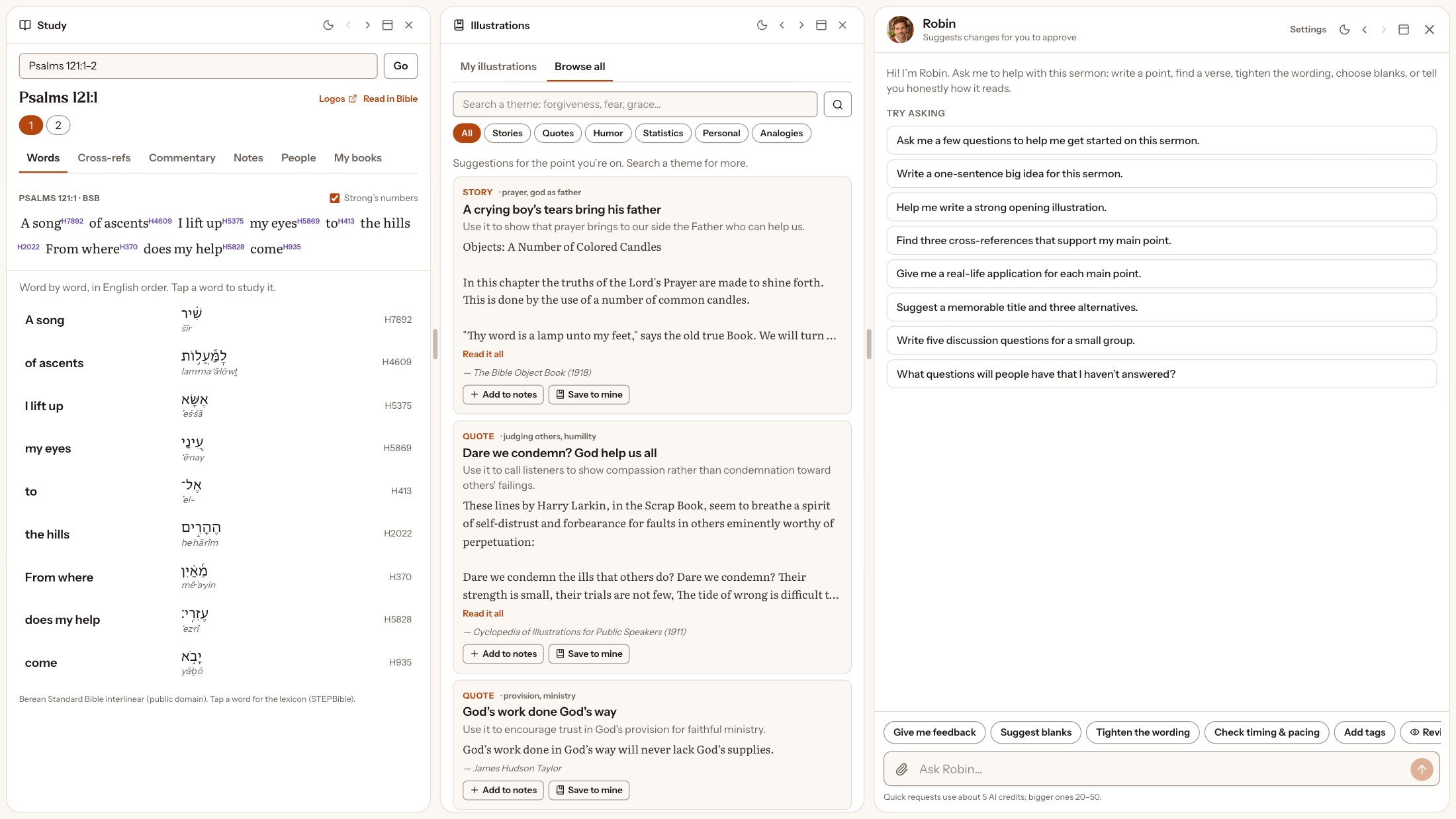
Study without leaving
Original words, cross-references and commentaries for the verse you’re on.
Arrange it your way
Either side, any width, or out on a second screen. BowNotes remembers.
A study library, built in
Click into any passage and the Study panel opens to it. Everything you find can go straight into your notes with one tap, with the source credited.
Greek & Hebrew
Tap any word for its meaning, how often the Bible uses it, how it’s translated, and every verse that uses it.
Commentaries
Cross-references
With the story each one belongs to and the shared words highlighted.
Dictionaries & topical Bibles
Easton’s, Smith’s and the International Standard Bible Encyclopedia, Nave’s and Torrey’s topical Bibles, what every name means, and Spurgeon’s Morning and Evening. Type “Bethel” or “forgiveness” to start.
Illustrations
Keep your own stories, quotes, humor and statistics, and search a classic collection by theme.
Bible versions
Open two Bibles at once, the same chapter in two versions or two passages, scrolling together verse for verse.
Maps, family trees, timelines and lists
Maps drawn like a Bible atlas: real terrain, shaded tribal lands and kingdoms, and place names big enough to read from the back row. Search more than 1,300 places or start from a ready-made map. Trace a family line, put events on a timeline, or turn the twelve apostles into a graphic. Each one shows up in your notes, handout and slides, in the style you pick.


Sermon graphics · Pro
BowNotes designs studio-quality artwork for every series and lesson, with your title lettered in. Describe the look you want, pick a style, or ask for three different options. Every design you make is kept, so you can switch back any time.


Real series graphics made in BowNotes.
The same design in every size you need, ready to use the moment it’s done. Download any one, or all six at once.


Export a presentation and the artwork is already there: the series graphic opens it, the lesson graphic takes the place of the title slide, and every point and passage sits on the text-free background, dark or light. Use the series artwork, the lesson’s, or both.
For your whole team
A better way to share curriculum. Build a lesson once for the whole team. Every teacher adds it to their own library with one tap, then makes it theirs, for their style and their audience.
Build lessons and whole series for the team. Teachers add them to their personal library in one tap.
Each teacher adapts the lesson for their age group, their style and their time, without changing yours.
No need to keep buying paperbacks and leader guides for every teacher, every quarter. Your lessons live in one place.
The same Scripture, big idea, slides and handouts in every class, and one search across everything your team has taught.
Your AI partner, on Pro
Robin is set up around how you speak: your audience, your tone, how you build a talk and the words you never use. Ask for honest feedback on a draft, a tighter point, the right verse or better blanks. He edits right in your notes, and you can see and undo every change.
Robin
Edits directly · you can undo
Be honest. Does my second point land?
It’s the strongest idea in the talk, but it’s buried under the story. I’d lead with “Faith is the hand that receives it,” then tell the story. Want me to move it?
Yes, and pick one blank in each point.
✓ Changed 4 things · See what changed · Undo
Find past notes by theme, people, places, dates, tags or Scripture written any way you like. On Pro, search by meaning: “dealing with fear” finds the talk about anxiety.
Import from Word and Google Docs in seconds. On Pro, bring in your whole archive of past sermons, PDFs, scans and photos of handwritten notes too, each tagged by theme, people and passage.
On Pro, a studio-quality graphic for every series and lesson with the title lettered in, in every size you need, plus matching slide backgrounds. Or upload your own.
See examples →On Plus and Pro, quiet study music plays right from the top bar while you prepare. Pick the albums you like.
Group talks into a series, keep the look consistent, and pick up next week right where you left off.
On team plans, share templates and finished talks, so a guest speaker or new teacher starts from your best work instead of a blank page.
This is the real editor. Change a point, add a verse, and watch your notes, slides and handout update as you type.
This is the real editor. Type anything, select a word and press Blank. Nothing here is saved.
Grace Is Free
Your notes, sized for your phone. Pages never scroll.
Sermons and lessons with Scripture built in, notes that fit your iPad, and slides your media team can grab before Sunday.
For pastors →Meeting outlines with wins, focus, decisions and next steps. Share templates with your team and keep everyone’s notes searchable.
For teams →Keynotes and workshops with a timer that keeps you on pace, slides in your brand, and notes that fit any screen.
For speakers →The outlines BowNotes opens with, free to copy.
Or see how BowNotes compares with Google Docs, Word, Apple Notes, Notion, PowerPoint and Logos.
Every plan includes the color-coded editor, templates, Teach Mode, verse lookup and search. Try every feature free for 14 days, no card needed.